# Kapacitor

[<mark style="color:blue;">Kapacitor</mark>](https://www.influxdata.com/time-series-platform/kapacitor/) is a real-time streaming data processing engine in the TICK stack. It can process both stream and batch data from InfluxDB, acting on this data in real-time via its programming language TICKscript.&#x20;

Route detailed alerts from Kapacitor to the right users in Squadcast.

## How to integrate Kapacitor with Squadcast

## In Squadcast: Using Kapacitor as an Alert Source

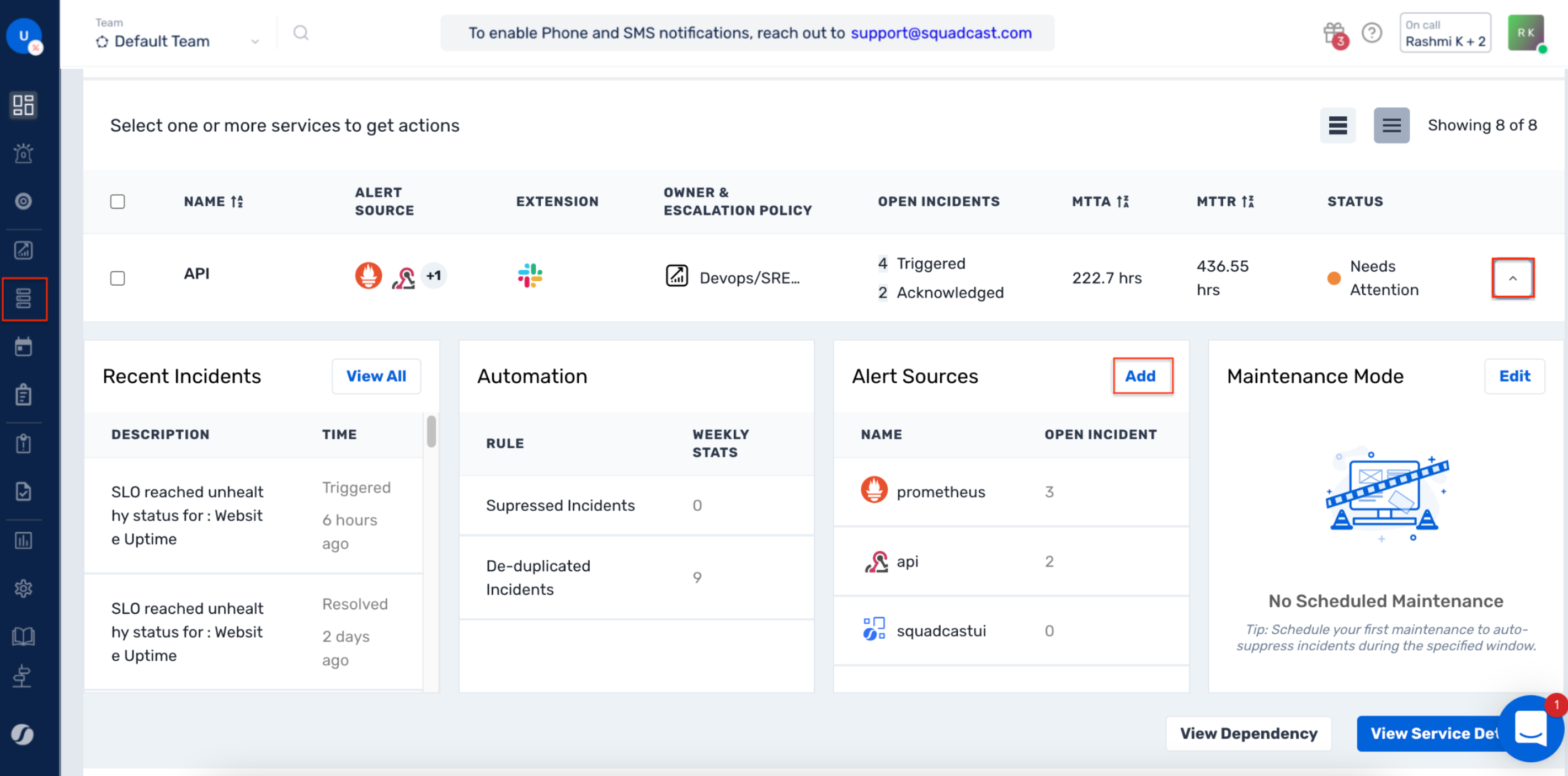
1. Navigate to **Services** -> **Service Overview** -> select or search for your Service. Expand the accordion -> In the Alert Sources section, click **Add**.
![](https://1574591692-files.gitbook.io/~/files/v0/b/gitbook-x-prod.appspot.com/o/spaces%2F8TaWz01jmUJl58p4ZVel%2Fuploads%2Fgit-blob-4fbd74e7ca0b30173c47a1d58ed6a0804a0465aa%2FAlert_Sources.png?alt=media)

2\. Select **Kapacitor**. Copy the displayed **Webhook URL** to [configure](#in-kapacitor-setup-a-squadcast-webhook) it within **Kapacitor**. Finish by clicking **Add Alert Source** -> **Done.**

![](https://1574591692-files.gitbook.io/~/files/v0/b/gitbook-x-prod.appspot.com/o/spaces%2F8TaWz01jmUJl58p4ZVel%2Fuploads%2Fgit-blob-af0e705e1536ffab16b1f0eef60271a4d9c59ece%2FKapacitor.png?alt=media)

{% hint style="warning" %} <mark style="color:orange;">**Important**</mark>**:**

When an alert source turns <mark style="color:green;">Active</mark>, it’ll show up under Configured Alert Sources. You can either generate a test alert from the integration or wait for a real-time alert to be generated by the Alert Source. \
\
An Alert Source is <mark style="color:green;">active</mark> if there is a recorded incident via that Alert Source for the Service.
{% endhint %}

## In Kapacitor: Setup a Squadcast Webhook

### **Method 1: Configuring Squadcast Webhook through Chronograf**

1. From your Chronograf account, hover over the *Alerts* icon in the sidebar, and select *Manage Tasks*

![](https://1574591692-files.gitbook.io/~/files/v0/b/gitbook-x-prod.appspot.com/o/spaces%2F8TaWz01jmUJl58p4ZVel%2Fuploads%2Fgit-blob-ee9fe9fb6606e57dff599214dcb16e06628069a9%2Fkapacitor_2.png?alt=media)

2. You can either modify an existing *Alert Rule* or create one by selecting *Add Alert Rule*

![](https://1574591692-files.gitbook.io/~/files/v0/b/gitbook-x-prod.appspot.com/o/spaces%2F8TaWz01jmUJl58p4ZVel%2Fuploads%2Fgit-blob-47c446c2906cd7e8b15262d1217dbe29f1611170%2Fkapacitor_3.png?alt=media)

3. Within the *Alert Rule Builder*, give the Alert Rule a *Name*, select *Alert Type*, *Time Series*, *Conditions*

Scroll further to *Alert Handlers*

(a) Select *post* from the drop-down

![](https://1574591692-files.gitbook.io/~/files/v0/b/gitbook-x-prod.appspot.com/o/spaces%2F8TaWz01jmUJl58p4ZVel%2Fuploads%2Fgit-blob-8b2b8505ae80d28a4d73a0c2631f8a1c5ca25328%2Fkapacitor_4.png?alt=media)

3. (b) Paste the Webhook copied from Squadcast under the *HTTP endpoint for the POST request*

![](https://1574591692-files.gitbook.io/~/files/v0/b/gitbook-x-prod.appspot.com/o/spaces%2F8TaWz01jmUJl58p4ZVel%2Fuploads%2Fgit-blob-e62b6f93b6f7bead65a69fa026b988957019899b%2Fkapacitor_5.png?alt=media)

4. Click on *Save Rule*

### **Method 2: Configure Squadcast Webhook in kapacitor.conf and use the endpoint in TICKscript**

1. Within kapacitor.conf, scroll to `[[httppost]]` and paste the following:

```
endpoint = "squadcast"
url = "<Copied_Webhook_URL_from_Squadcast"
headers = { Content-Type = "application/json" }
```

3. Go to your TICKscript, within the *alert* context, and set up a [post call to the above-configured endpoint](https://docs.influxdata.com/kapacitor/v1.5/event_handlers/post/#example-tickscript-using-a-pre-configured-endpoint)

{% hint style="info" %}
**Pro Tip:**

In Mac OS, Kapacitor's configuration file is generally in `/usr/local/etc/kapacitor.conf` and in Linux machines, it generally is in `/etc/kapacitor.conf`
{% endhint %}

That is it, you are now good to go!

* Whenever an alert is generated in Kapacitor, an incident is triggered for it in Squadcast.&#x20;
* When the alert recovers in Kapacitor, the corresponding incident will be **auto-resolved** in Squadcast as well.
